Compare the same scope
Set one time horizon and one currency. Include licence seats, usage, internal operating time, maintenance and hosting in the monthly figure you supply. Put implementation and migration into setup costs.


BUILD VS BUY CALCULATOR · 1.0.0
Compare build, buy and hybrid software costs month by month using your setup, recurring, annual-change and exit assumptions. Export a transparent cost scenario.
Web tool and download available. OpenAI directory publication requires separate checks and approval; this is not an approved listing.

The example is a starting point. Enter your own estimates, calculate and export both inputs and results. Browser calculations run locally; the workbench is excluded from session replay. Avoid confidential names and personal records in labels.
Runs in your browser. Your calculation inputs stay on this page.
Change the illustrative inputs above, then calculate. Results and exports include assumptions and limitations.
Compare configuring an existing procurement platform, connecting a workflow to your ERP, and building a custom product against the same buying task. The calculator above compares your cost assumptions; it does not establish that an option can handle the workflow.
CollectiveSpend’s public METIS screens show a USB flash-drive request, requirements, AED totals and a pending approval state for a UAE client. Inspect that record as product evidence. Screen values are example data, not measured savings.
For your evaluation, ask each supplier to demonstrate one comparable request, a changed quote and an unavailable approver. Those are illustrative acceptance cases to agree with your team, not claims that a client had those failures.
Inspect the CollectiveSpend Workflow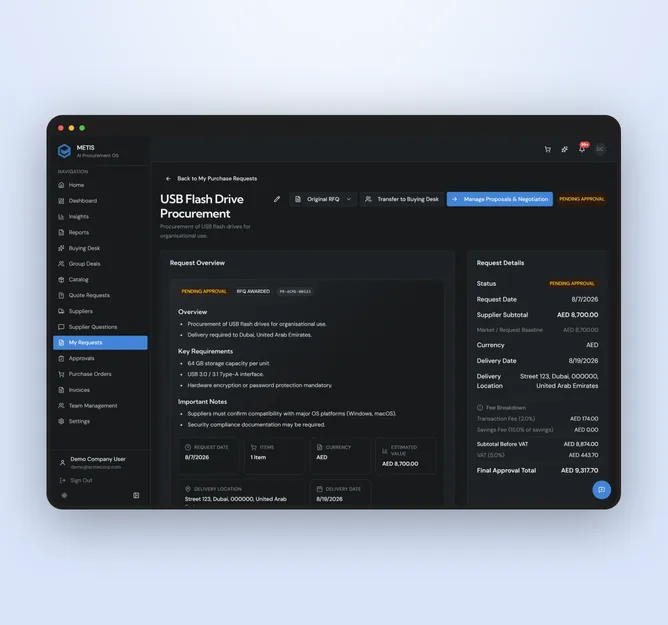
A repeated handoff should not create another business order. A changed quote should follow the agreed approval rule. An unavailable approver needs an authorised next step. Record the evidence and unknowns before choosing the lowest cost.
Use the same brief in USD, GBP, AUD or EUR with your own quotes. Agree remote review hours, data access and operating responsibilities for your market. The brief is editable and ungated; no commercial outcome or compliance certification is implied.
Set one time horizon and one currency. Include licence seats, usage, internal operating time, maintenance and hosting in the monthly figure you supply. Put implementation and migration into setup costs.
Annual changes apply at the start of each new year: months 13, 25 and so on. The exit cost is included in the last month. These are nominal, undiscounted scenarios, not forecasts.
A cheaper option may miss an essential workflow or create unacceptable vendor dependence. Review feature fit, reliability, data access and delivery risk separately. A first cost crossover can reverse later.
Arcforth works on customer workflows, operator handoffs and production software. These tools turn a narrow planning question into a result another person can inspect. They do not claim that the example comes from a client or that a score predicts a commercial outcome.
Review our work on a wholesale marketplace for evidence of our product work. Use Product Planner to connect the calculation to a first-release brief, or discuss a product build when you need implementation help.
AWS guidance on documenting architecture decisions provides relevant method or provider context. Sources were reviewed on 19 November 2026. The calculations and example scenarios here are Arcforth’s implementation; no current provider prices, exchange rates or market estimates are embedded.
The JSON export preserves the inputs, version, output and limitations. Re-run it after changing an assumption. The same calculation module powers the browser workbench and the remote plugin tools.
The downloadable package includes the Arcforth icon, task instructions, tool connection metadata and review examples. Its remote MCP endpoint is https://thearcforth.com/api/mcp/build-buy/. In a supported developer setup, connect that endpoint or install the package. Availability depends on the host and your workspace’s policies.
When the host invokes the remote tool, the structured arguments are sent to Arcforth’s calculation endpoint. No login, purchases, external account access or provider API key is needed. The server calculates in memory and returns the result. Read the product tools privacy notice before sending inputs.
Version 1.0.0 was submitted under the earlier name Arcforth Build Buy Lab. Its uploaded review identity is preserved; the task label on this page is now Build vs Buy Calculator.
Downloading this ZIP does not install a public directory listing. The publisher must finish OpenAI’s checks, review and publication separately.
Download version 1.0.0For teams seeking a technical partner, review MVP development for US founders, MVP development for UK founders or our technical partner approach. The tool works independently of an Arcforth engagement.
