01 - Offline Scanning and Shared Admission Are Different Problems
An offline event check-in app can keep a local ticket list and record an admission without reaching the internet. That does not give a second disconnected phone immediate knowledge of the first scan. The practical buying question is which decisions staff may make while shared state is unavailable.
This guide proposes a two-gate rehearsal with synthetic tickets. It is an engineering and operations exercise, not a report of a client incident. Mesmeride and Ques.uk provide related event-product examples; the offline policy for your release is agreed and demonstrated separately.
02 - Put One Ticket Through Two Disconnected Entrances
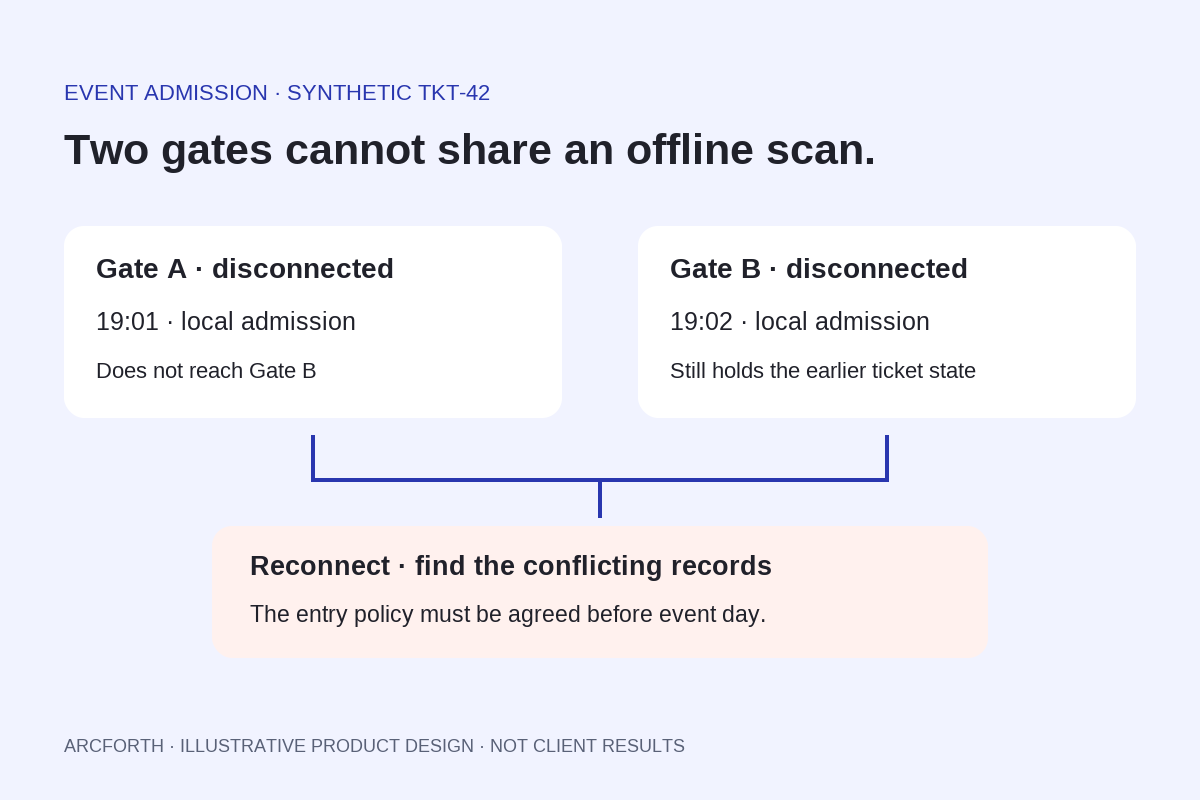
At 18:50, Gate A and Gate B load the synthetic ticket TKT-42. At 19:00, both lose their shared connection. At 19:01, A admits the ticket from its cached list. At 19:02, B sees the same unchanged local state and also admits it. At 19:05, both reconnect.
| Observation | Meaning |
|---|---|
| A has one local admission | A knows its own action |
| B has one local admission | B did not receive A’s action |
| Both upload TKT-42 | The server can now identify a conflict |
| Two door decisions, one ticket identity | Reconciliation cannot reverse an entry that already happened |
Do not select an admission policy by assuming that the earlier phone timestamp always wins. Device clocks and delayed uploads require an explicit rule. Preserve the relevant scan records and the supervisor’s decision so the operations team can understand what happened.
03 - Choose a Policy Before Choosing the App Architecture
A connected design can ask a shared authority for the current ticket decision. An assigned-gate design can limit which entrance is allowed to admit a ticket offline. A venue-local network can keep gates communicating when upstream internet fails. A provisional-entry design can allow local admission while accepting and managing the later conflict risk.
Choose the option with the organiser and venue team. Consider the cost of turning a valid attendee away, the event’s capacity rules and who can approve an exception. If the requirement is strict cross-gate exclusion, several fully disconnected devices independently admitting the same ticket set do not satisfy it.
04 - Test the Cached Data and the Device Readiness State
The device needs the correct event, session, permitted ticket set and local write capability before the connection is lost. Display the most recent refresh and the assigned operating mode. If the required data is missing or storage cannot be written, the app should expose that problem before a staff member relies on a green scan.
MDN describes IndexedDB as transactional browser storage and notes browser-dependent storage limits and eviction. For a browser implementation, test the supported devices and storage conditions. Installing an app shortcut or caching a page does not by itself establish durable admission records.
Include camera permission, battery loss, a restarted app and a full device in the rehearsal. A ticket cancelled after the last refresh also requires a defined offline response; an old list cannot reveal a change it has not received.
05 - Retry Uploads Without Losing the Door History
Give each local operation a stable identity and retain it until the server has acknowledged the intended record. Replaying an upload after a timeout should not silently create another copy of that operation. Keep processing failures visible to the permitted operator and provide a safe recovery route.
Distinguish attempts, provisional admissions, confirmed admissions and conflicts in the operations view. A single headline counter can conceal a queue of unresolved decisions. Agree when reports become final and what the event team reviews after all supported devices have synchronised. These are proposed acceptance behaviours, not claims about a named product’s implementation.
06 - Compare the Existing Organiser Tool First
Eventbrite lists offline check-in and later sync among its Organizer app features. Check whether the existing tool meets your gate arrangement, ticket roles and exception workflow before paying for a custom layer. Feature wording should lead to a demonstration on your event setup, not an assumption about every offline edge case.
For a custom design, keep the ticketing source, staff roles and integration contract in the brief. UK and Australian teams should also identify the venue’s time zone and supported devices. Test the event date and session while a phone has a different local clock setting.
07 - Take a Rehearsal Sheet to the Build Discussion
The twelve-case check-in rehearsal sheet covers a repeat local scan, a wrong session, a cancelled cached ticket, a cross-gate conflict, repeated upload and a device handover. Every setup is synthetic and the observed-result column is blank.
Record the app version, device, ticket source and evidence when your team runs it. Then use event check-in app development to define the admission layer or discuss your gate workflow with its decision owner. A useful proposal explains what staff will do when the shared connection is unavailable.
Frequently Asked Questions
Why can two offline devices accept the same ticket?
Each can act on an earlier local ticket state without receiving the other device’s new scan. An explicit gate assignment, shared connection or provisional-admission policy is needed.
Does an offline counter show final attendance?
Keep provisional actions, confirmed admissions and unresolved conflicts distinguishable. Final reporting depends on the agreed reconciliation process and the remaining device records.
What should an offline rehearsal include?
Use synthetic tickets to test repeated scans, wrong sessions, cancellations after refresh, disconnected gates, repeated upload, storage failure and authorised device handover.
Rehearse the decision your staff will make offline.
Bring the ticket source, entrance arrangement and the owner of an admission exception. Define what each disconnected gate may do before event day.
The design, engineering, and product research collective at Arcforth building tomorrow's category-defining digital products.