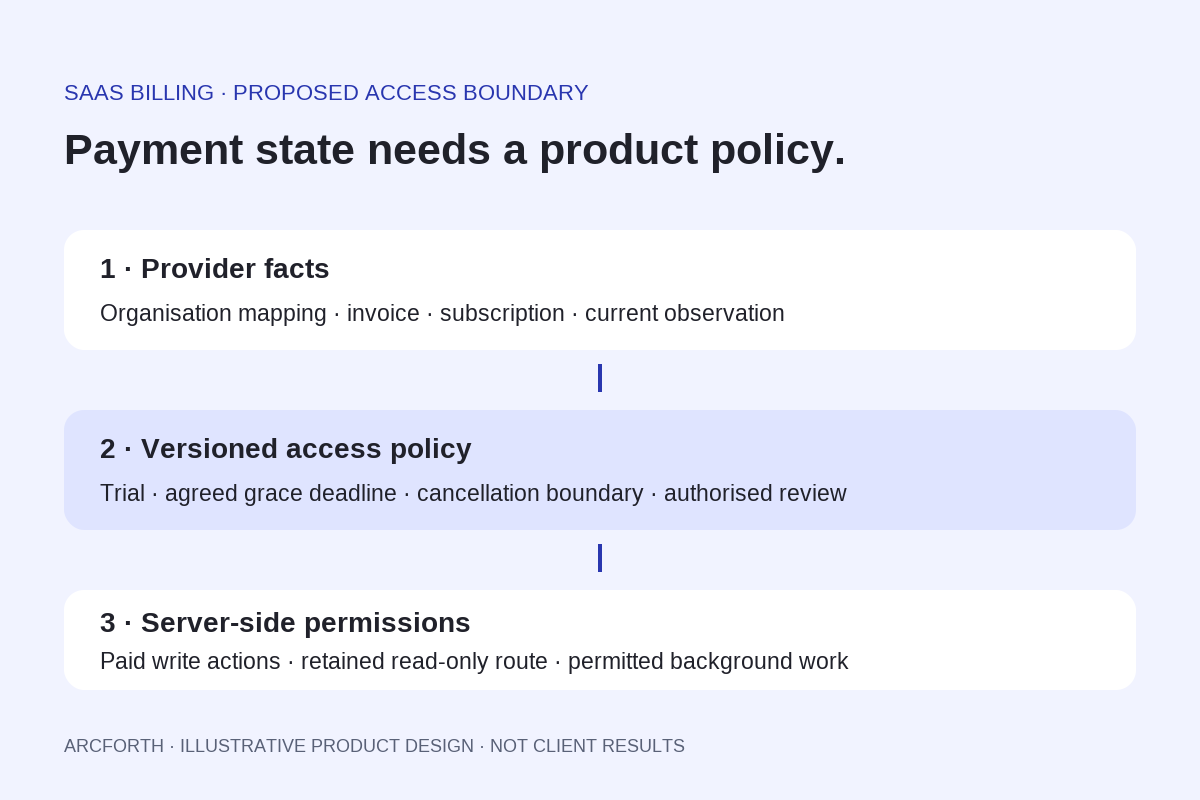
01 - Separate the Payment Record From the Permission Decision
SaaS subscription access control decides which actions an organisation may perform under its current agreement. The billing provider supplies payment and subscription facts. Your product applies its policy and enforces the resulting permissions. Keeping those responsibilities visible makes a failed renewal easier to handle and investigate.
This guide proposes a synthetic Team Alpha account with a monthly plan. The example policy allows a 72-hour grace period after the agreed failed-renewal trigger, followed by read-only access. That is an illustrative product decision, not Stripe’s default policy or a recommendation that every SaaS should use the same period.
02 - Follow Team Alpha Through the Renewal
| Stage | Provider or operating fact | Proposed application behaviour |
|---|---|---|
| Before renewal | Current confirmed period is valid | Plan actions remain available |
| Renewal fails | The relevant payment problem is recorded | Start the agreed grace workflow and notify the account owner |
| Grace expires unresolved | The policy deadline has passed | Disable paid write actions and retain the agreed read-only route |
| Payment later resolves | Current provider state is reconciled | Restore only the permissions the updated agreement supports |
| State is uncertain | Processing or reconciliation is incomplete | Expose an investigation state and use the agreed access fallback |
Keep the trigger reference, policy version and deadline with the decision. The expiry must be evaluated even if no new provider notification arrives at that moment. Apply the same rule to a scheduled job or API action as to a visible button. A hidden button alone does not prevent the account from calling a server operation.
03 - Do Not Replay an Old State Over a New Decision
Suppose the grace period has ended and an earlier notification arrives late. Reapplying the old payload as if it were the latest agreement could give Team Alpha an incorrect entitlement. Record the notification, identify the relevant account and reconcile the current provider object before an ambiguous transition.
Stripe says events can arrive out of order and describes duplicate-event handling. Use stable provider references and processing evidence. A browser success screen, arrival order and a device timestamp are not substitutes for the state your policy needs. Our proposed application behaviour must be tested against the actual provider and integration version.
04 - Treat Subscription Status as Context, Not the Whole Policy
Stripe’s subscription documentation explains that failed-payment settings affect later state transitions and that an active subscription does not necessarily mean every associated invoice is paid. Read the configured provider behaviour before mapping a status to application access.
For Team Alpha, write down which subscription and invoice govern the purchased plan. An unrelated paid invoice must not unlock a different organisation. A scheduled cancellation may preserve access until the confirmed period boundary, while an immediate termination is a different transition. Refund and dispute handling also need an explicit business decision; do not infer them from the presence of a payment event alone.
05 - Check Membership, Seats and Background Work
The person paying may not be the person operating every workspace. Test who can change the plan, invite a teammate, export records or manage the payment method. If an account exceeds its allowed seats after a downgrade, specify the review and restriction route instead of silently removing members.
Decide what read-only means for background tasks. A workflow that continues producing paid API work after the account loses its write permission may violate the intended boundary. Include job scheduling and external API actions in the same review. Preserve the customer’s permitted route to update payment details or contact support.
06 - Give Support Evidence Without a Silent Back Door
The support view should show the organisation, relevant provider references, last observed state, current policy version, resulting permissions and any pending reconciliation. An authorised temporary grant should have a reason, owner and expiry. Keep that decision distinct from the original provider record.
For US self-service products and UK, European or Australian B2B accounts, the purchasing process may differ. Confirm the actual invoice, payment and account-owner workflow with the business. A geographic page label does not answer which organisation was purchased for or who may change its access.
07 - Turn the Policy Into Sandbox Acceptance Cases
Download the twelve-case billing and access test sheet. Rehearse repeated delivery, an old update arriving late, grace expiry without another event, period-end cancellation and a mismatched tenant. All records are synthetic and every observed-result field is blank.
Record the integration version and evidence from the sandbox. Compare the customer interface with server-side permissions and the support view. These checks are proposed acceptance criteria, not a claim that a new billing implementation has already passed them.
08 - Scope the Billing Integration Around One Complete Lifecycle
Bring the provider account owner, the application organisation model, the current access rules and one billing lifecycle that needs to work. Decide which existing paid accounts, if any, need a separate migration plan. Avoid changing every plan and customer record merely to validate the first integration.
Review SaaS billing integration services and the B2B SaaS product scope, then discuss your subscription lifecycle. Ask the delivery team to demonstrate the failed renewal and recovery with the people who will operate it.
Frequently Asked Questions
Should every failed payment immediately block a SaaS account?
The business defines the access policy, including any grace period and retained read-only route. Implement and test that policy against the provider’s configured lifecycle.
Is a Stripe active status enough to infer every invoice was paid?
No. Stripe’s documentation explains that active status can coexist with outstanding invoices depending on settings. Identify the provider facts that the agreed access policy requires.
What if no event arrives when grace ends?
The application must evaluate its own policy deadline at the relevant access boundary or scheduled evaluation. A new webhook should not be the only way an expired permission is reconsidered.
Are these twelve cases completed test results?
No. They are proposed synthetic acceptance cases for your team to adapt and record in a non-production environment.
Make one billing lifecycle reviewable.
Bring the provider owner, organisation model and access rules. Demonstrate the failed renewal, deadline and recovery in a non-production account.
The design, engineering, and product research collective at Arcforth building tomorrow's category-defining digital products.