Make availability understandable
Define which properties can be viewed, how a session is offered and who can change it. A listing and a viewing session need an explicit relationship.

Services
A viewing involves a home seeker, a property, an agent and an operating team. Arcforth helps property businesses turn those relationships into a booking workflow with clear availability, attendance and next steps.
Define which properties can be viewed, how a session is offered and who can change it. A listing and a viewing session need an explicit relationship.
Agree how agents identify bookings, handle changes and record attendance or follow-up. Keep branch and team responsibilities visible.
Decide the next action for interested people, cancellations and unanswered requests. Link the viewing to the relevant application or customer record where required.
A viewing product needs more than a calendar field on a listing. Identify the property record, the available session and the person’s booking as related but distinct objects. That makes it possible to change a session without losing who booked, or to record several people attending the same viewing.
Map the agency structure as well. A branch manager, listing agent and private lister may have different responsibilities. Start with the roles and operating rules needed for the first release. Do not assume the rules for sales, rentals and one-off private listings are identical. The first scope should state which journeys are supported and who resolves exceptions.
Consider an agency offering a scheduled property viewing. A home seeker finds the property, books the session, receives the relevant details and attends or cancels. The agent needs an accurate list and a way to record the next step.
| Situation | Behavior to agree |
|---|---|
| The session changes after bookings exist | Keep the booking history and identify who needs an update |
| A person books the same session again | Apply the agreed duplicate and capacity rule |
| The agent changes branch or assignment | Preserve the correct operational ownership and access |
| A notification fails | Keep the booking valid and show the staff recovery action |
This is an illustrative acceptance plan, not a list of features being asserted for a particular client release.
Choose the events that merit a message and who owns the content and response. Include time zones, the property’s local session time, changed sessions and the treatment of cancelled bookings. If paid messaging is part of the product, agree usage visibility, provider access and operating-cost ownership.
Determine whether a CRM, listing provider or property-management system remains the source of truth. A first release can be narrower than replacing every existing tool. Agree import, update and reconciliation requirements explicitly. For the customer-facing journey, test that someone can understand the property, book the correct session and find the next action without staff help.
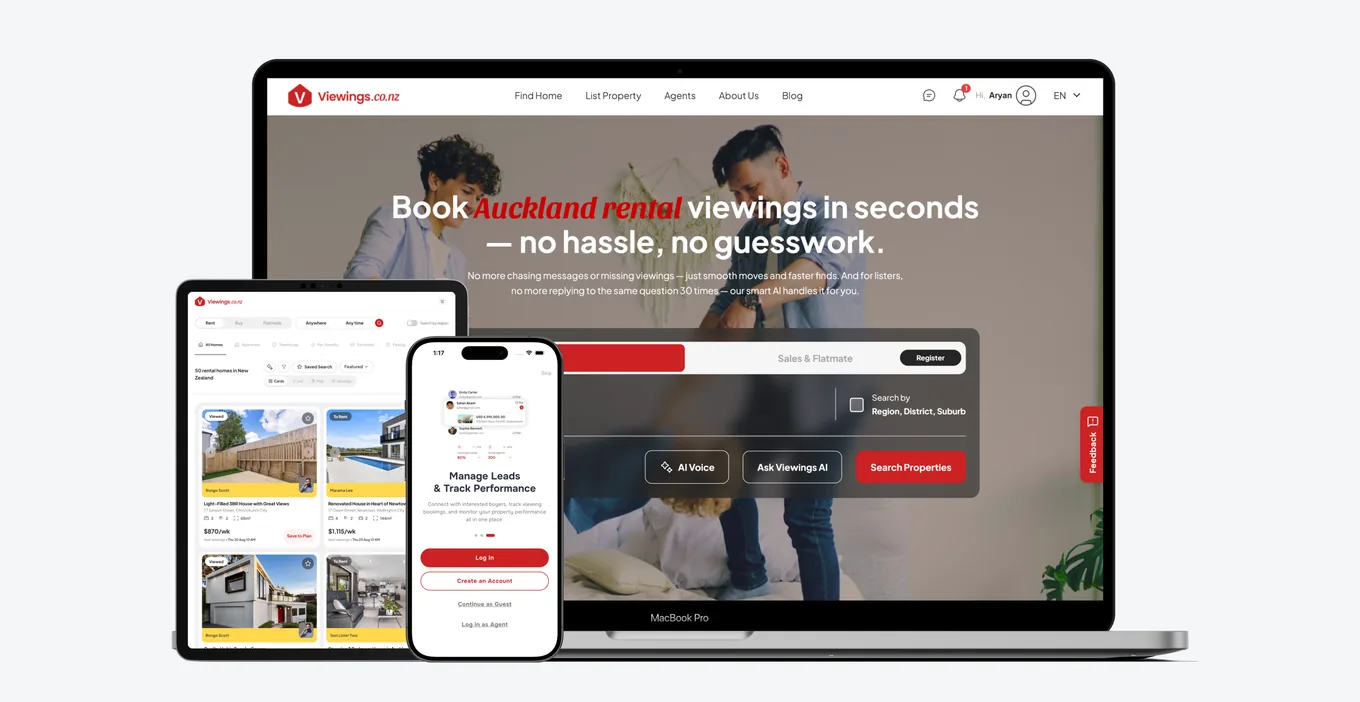
The public Viewings case shows property discovery, viewing, application and agreement workflows built for a New Zealand client. It is relevant property-product work; it does not establish that every agency rule or integration for your market is already implemented.
Bring the listing structure, agent and branch roles, current booking process, communication channels and the first market you intend to serve. For an Australian build, the Australian product delivery guide helps frame review schedules and market-specific dependencies. For a broader property platform, compare PropTech software development. This page focuses on the viewing and operational journey inside that larger product.
Simpler journeys for property discovery, viewings, applications and agreements.
View Viewings Case StudyMap property records, sessions, bookings and the people operating them.
Agree duplicate, change, attendance and follow-up rules for the first release.
Build the home-seeker and agent journey with integration and notification checks.
Pilot the workflow and assign support, operating costs and next-release decisions.
A Product Pilot ($1,499 once) focuses on one workflow, core flows and prototype, build-ready requirements and an MVP roadmap. A Product Squad ($3,490 per month) supports ongoing product direction, design, engineering and iteration. An Embedded Product Unit (from $5,000 per month) adds capacity for larger products and multiple workstreams.
That can be part of the scope. Define which organisation, branch, property and booking each role can manage, including reassignment and staff changes.
No. Viewings is New Zealand product work. Your market’s listing sources, providers, operating rules and working arrangements need their own assessment.
Include them when they support the chosen workflow and operating process. Agree the event, message owner, delivery result and recovery path, rather than adding reminders without a support plan.

If you have committed to a software venture and need a team to shape, build and keep improving it, start with a product conversation.
Human judgment. AI-native delivery. One team accountable from the first decision to every release.